
3 Prompt Fixes for Cinematic AI Film Grain That Looks
Quick Tip: Copy the prompt with the button above — paste it into Midjourney as-is (--ar and --style raw included). On DALL-E, Flux, Stable Diffusion, Ideogram, Leonardo AI or Firefly, keep the descriptive text and drop the -- flags. Try the same scene at two different aspect ratios: composition and light falloff change more than you'd expect.
Why 'Film Look' Fails and Film Stock Succeeds
The biggest tell in AI cinematic prompts is not noise; it is uniformity. Ask for “35mm film grain” and most models return a flat texture layer that sits above the image like a screen door. That happens because the phrase has been averaged across scanned prints, digital noise, VHS artifacts, and social filters. Film grain is not a single mood. It is a chemical response tied to stock, exposure, and development. Name those variables and the texture changes from decoration to structure.
Kodak Vision3 500T pushed two stops gives the model a rendering behavior instead of an adjective. It knows the stock’s color science, its halation, its shadow density, and how grain grows when underexposure is corrected in development. The same logic works for sci-fi posters and cyberpunk portraits because the film system stays constant while the subject changes. You are no longer asking for a vibe. You are specifying a physical pipeline the model can imitate.
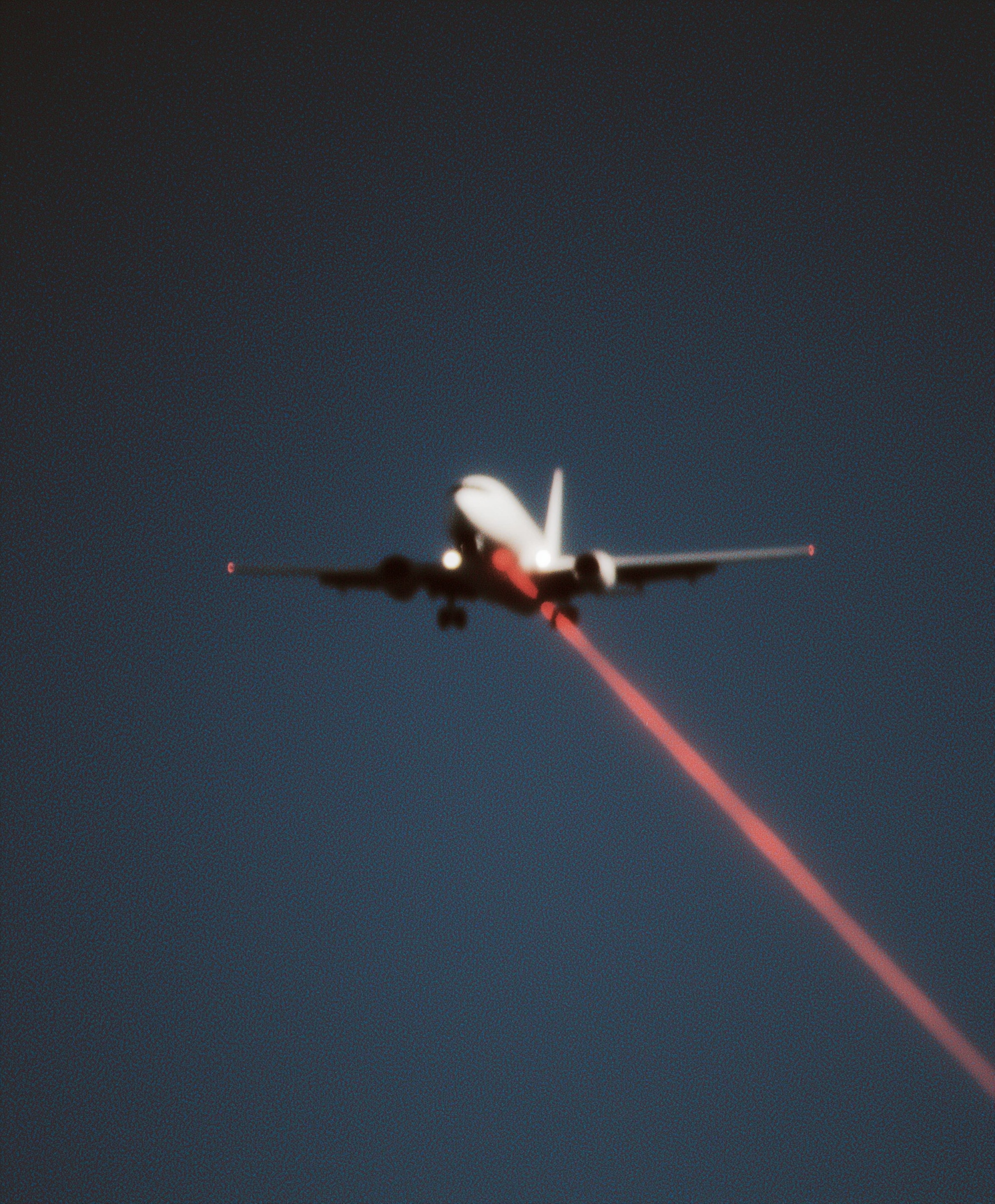
That is why the laser plane prompt can hold together under heavy grain. The stock is named, the push is named, and the model resolves light as if it passed through an emulsion. Replace those specifics with “cinematic film look” and the scene collapses into a soft orange fog. Specificity does not make the prompt less creative. It gives the creative idea a material body. For sci-fi posters, that body is what separates a convincing frame from a filter.
Separating Motion Blur from Depth of Field
Motion blur and shallow depth of field are two completely different optical phenomena, and conflating them is why so many AI "cinematic" images look mushy. Depth of field is a function of aperture and focus distance — it affects everything at a given distance from the lens equally. Motion blur is a function of shutter speed and subject velocity — it affects only what moves during the exposure.
In this image, the jet is blurred because it's moving. The laser is sharp because light emitted from a source is not smeared by the subject's motion in the same way a reflective surface is. If you tell the model "blurry plane and blurry laser," you get a soft image with no focal hierarchy. If you tell it "blurred fuselage, razor-sharp beam," you get depth: the eye reads the beam as closer, brighter, and more present, which is exactly the threat hierarchy a paranoid thriller needs.
The prompt handles this by assigning blur to the subject and sharpness to the light. It also adds "lens breathing and chromatic aberration at frame edges" — a subtle cue that the camera is a physical object with imperfect optics, not a render. This matters because perfect optics read as CGI. Slight edge fringing reads as glass. For a related approach to making AI output feel photographed rather than generated, the same logic applies in horror-adjacent cinematic prompts, where imperfection is the difference between eerie and cheap.
Laser Physics: Beam, Cone, and Bloom
A laser in a vacuum is invisible. You only see it when it scatters off particles — dust, haze, moisture. This is why "glowing laser" produces a glowing stick, while "volumetric cone in atmospheric haze" produces something that feels like it occupies space.
The distinction is physical, not stylistic. A beam has zero width in the ideal case; what you photograph is the scatter volume around it. When you specify "faint volumetric cone" alongside "razor-sharp beam," you're telling the model two things: the core is intense and well-defined, and the surrounding air is faintly lit. That combination is what makes real laser footage look supernatural — the beam is impossibly thin while the air around it glows.
Bloom matters for the same reason. When a laser exits an airframe, the light hits the metal edge and produces a small halo. Adding "faint bloom halo where it exits the airframe" gives the beam a point of origin, which anchors it in the scene rather than letting it float. Without an origin, the laser looks pasted on. With it, the laser looks emitted. For more on how small physical details create believability, the technique in this grunge texture breakdown follows the same principle: specificity at the contact points sells the whole frame.
Composition as Threat Geometry
The diagonal is the most aggressive line in visual composition because it implies instability — nothing in nature rests on a diagonal. A centered subject with a diagonal element cutting through it creates tension between order (the plane, centered) and disruption (the laser, angled).
This prompt specifies "centered composition with aggressive diagonal thrust toward the bottom-right corner." That's not decoration. Bottom-right is where the eye exits the frame in left-to-right reading cultures, so a line pointing there feels like it's escaping — or like it's aiming at something off-screen. Both readings serve the conspiracy-documentary tone.
If you move the laser to a horizontal or vertical, you lose the threat. Horizontals read as calm; verticals read as monumental. Only the diagonal reads as action. Pairing it with a centered subject maximizes the contrast between stillness and motion, which is the entire emotional payload of the image.
For color grading, tools like Midjourney handle the crushed-black, lifted-shadow pairing well when you specify it explicitly, and Adobe Firefly is useful for testing how the same frame reads under different LUT treatments before committing to a final render.
Building Your Own Variant
Once you understand the structure — film stock, blur hierarchy, light physics, diagonal composition — you can swap variables without breaking the recipe. Replace Vision3 500T with Cinestill 800T and you get halation around the laser. Replace the passenger jet with a drone and the threat scale shrinks but the grammar holds. Replace crimson with a cold cyan and the tone shifts from paranoid to clinical.
The next step is to test one variable at a time. Change only the film stock and compare grain structure. Change only the light color and compare emotional read. Each isolated change teaches you what the model is actually responding to, which is the only way to move from copying prompts to engineering them.
Key Principle: Never write "cinematic." Write the film stock, the push amount, and the light's physical behavior. The model renders systems, not moods — name the system and the mood follows. If you want to go deeper, read master dynamic dj club scenes cinematic.